3D Sites - 3
https://www.youtube.com/watch?v=uPIIJDmq5OU - Luke Carter
Video Animated Sites
The process & Prompts
Alright after some testing i unlocked a new cheat code when it comes to designing insane websites really fast. Here goes ...
GPT Image 2 -> Codex Website Workflow
Instead of asking Al to design a basic website, we use GPT Image 2 to create the art direction first. Then we use Codex to turn that visual direction into a real, responsive website.
The workflow is:
GPT Image 2 creates the visual reference
-> GPT Image 2 strips out the UX/text
-> Codex builds the real website layer
-> Codex visually QA's the result and improves it
This gives you the "wow" of image generation, but still gives you a usable website.
Generate the website design reference
The first step is to create a visual reference in GPT Image 2.
The key is this:
Do not ask for a normal landing page.
Ask for a visual composition system.
That means you want to prompt for the structure and visual world first, not just the copy.
Use this prompt structure for your project or use some of the starting prompts in the other lessons in this course:
Create ONE horizontal 16:9 website hero design reference, but DO NOT-use a conventional website hero layout.

Business: luxury real estate editorial / architectural property brand.
Layout archetype: full-bleed architectural magazine cover.

Composition first:
- Full-bleed cinematic architectural interior/exterior image dominates
the entire canvas.
- Typography is integrated like a luxury magazine cover: oversized serif title crossing the image, elegant vertical captions, small navigation tucked into the edges.
- No left-column marketing block. No image-right/copy-left split. No eyebrow/subheadline/two-button stack.
- CTA should appear as one discreet editorial stamp or small pill in a corner, not two buttons.
- Use asymmetry, cropping, negative space, and cover-design hierarchy.

Palette: warm limestone, cream, black ink, aged gold, muted olive shadow.
Typography: large readable editorial serif headline, refined sans for small UI.
Copy to include legibly but minimally: "ATELIER", "Homes with a point of view", "View collection".

Make it feel like an Awwwards-level architectural magazine homepage, structurally different from a normal SaaS hero.
Generates
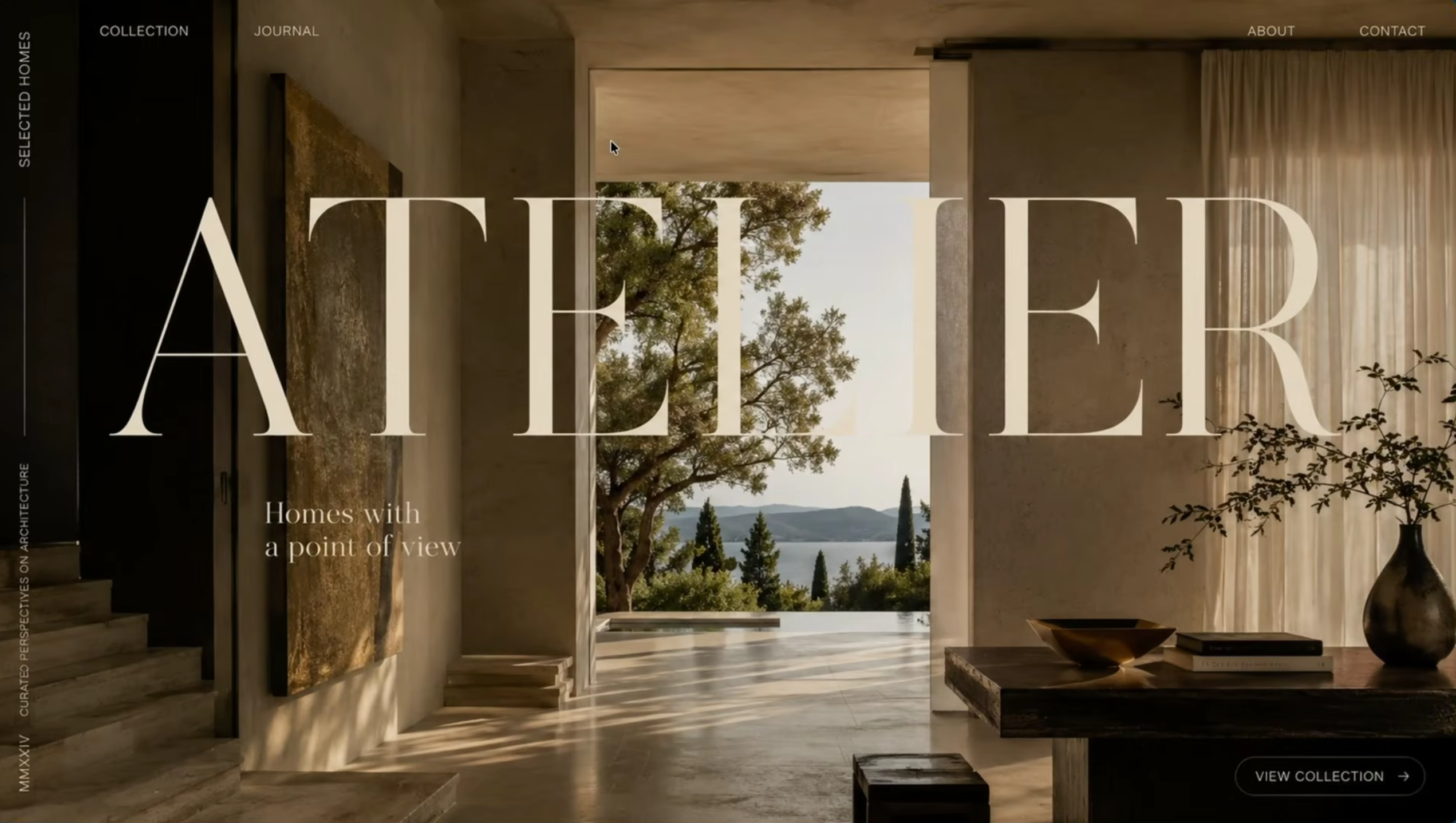
Get the background image without any UX in front and this will be made into video
Overall Planning
Codex will create the actual site UX.
Provide to Codex the actual reference image and the background
Prompt for Strip UX / Background Plate Prompt
Remove readable UI and keep the art plate for codex
Create a clean 16:9 website hero background / art plate from this design reference.

Remove readable website Ul/text:
- logo / wordmark
- navigation
- headline/title text
- CTA labels/buttons
- captions
- readable marketing copy

Keep the art-directed visual world:
- composition
- lighting
- atmosphere
- textures/materials
- photography/illustration
- decorative motifs
- depth
- palette

Do not redesign into a different style.
Do not crop tightly.
Do not use transparency.
Do not use checkerboard.
Leave enough clean visual space for Codex to overlay real coded
nav/headline/CTA later.
Gets this
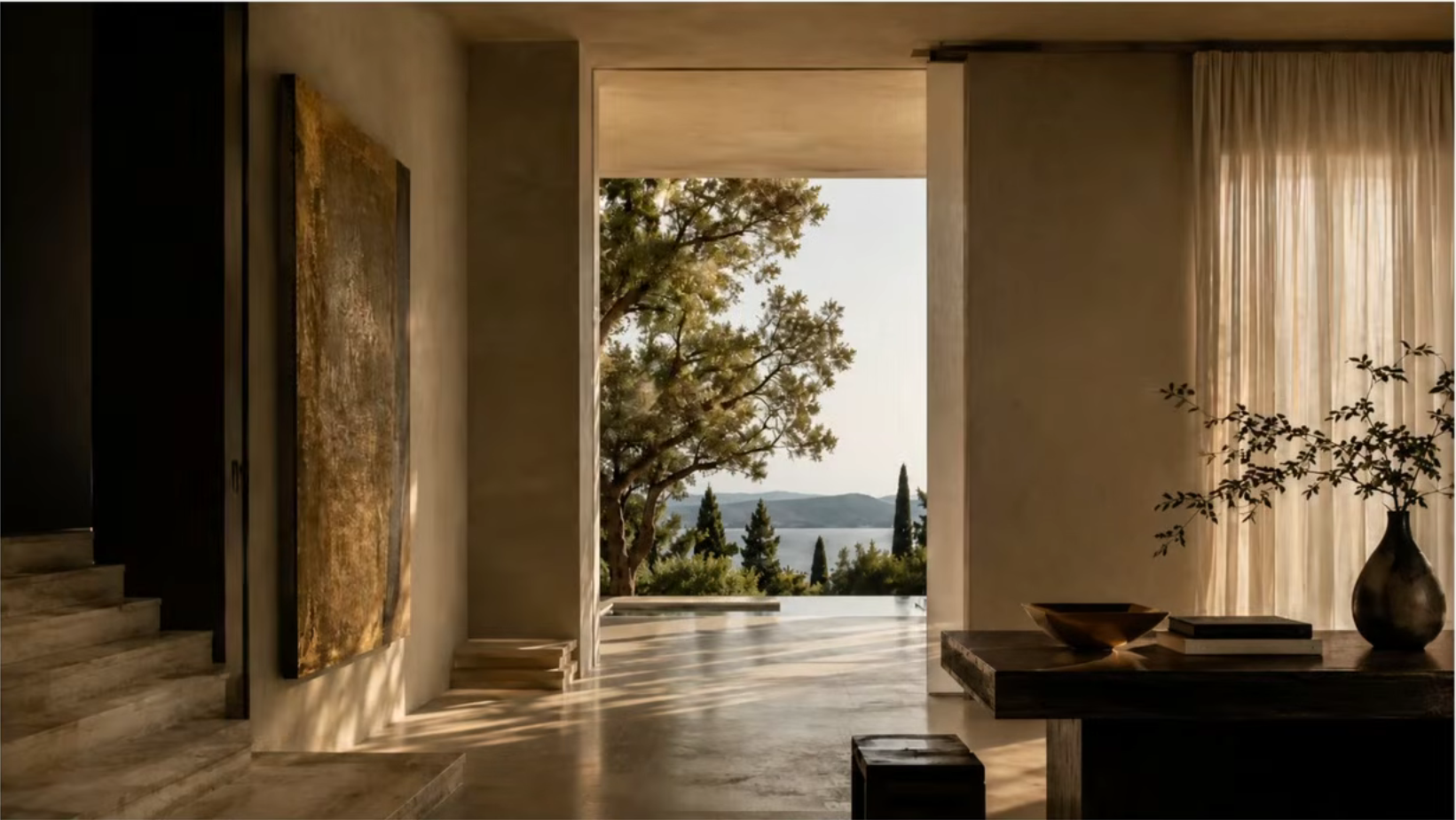
Download both image in a folder lets say /public/images/ for your project
Make Hero Coded for to be used in Site
Awsome-Website/public/imageswill have two images- Open project folder
Awsome-Websitein Codex
We are building a website hero section from a visual reference.

I am attaching:

1. The original hero reference image
2. The clean background/visual asset that should be used in the coded hero

Your job is to build the coded hero shell around the provided background asset and match the reference image as closely as possible.

Before coding, first analyze the reference image and write a short visual spec covering:
- overall composition
- layout grid
- nav placement and spacing
- logo/wordmark style
- headline size, line breaks, and position
- subcopy size and position
- CTA styling, size, radius, color, border, glow/shadow and placement
- background asset crop and positioning
- overlay/gradient needs for readability
- colopalette and contrast
- spacing and visual balance
- responsive behavior

Then build from that spec.

Important fidelity rules:
- Do NOT redesign the hero.
- Do NOT invent a new visual style.
- Do NOT manually recreate the background artwork.
- Use the attached background/visual asset as the hero visual source of truth.
- Recreate the navigation, headline, subcopy, CTA buttons, overlays, gradients, borders, spacing, typography, and responsive layout around the asset.
- Match the reference as closely as practical on the first pass.
- Keep the coded version clean, responsive, and usable.
- Preserve the same general text position and background focal point position from the reference.
- Do not crop or reposition the background randomly.
- If text needs readability, add a subtle gradient/vignette overlay rather than changing the design.

Build only the hero section first.

Use the existing project stack. If there is no project yet, use React + CSS or Tailwind.

Asset instructions:
- Use the attached background image/video in the hero.
- If the asset is an image, implement it as a responsive hero background or positioned hero visual.
- If the asset is a video, implement it as a muted autoplay looping background video.
- Add gradient overlays only where needed for text readability.
- Do not destroy the visual with heavy overlays.

After building:

- compare your implementation against the original reference yourself
- fix obvious first-pass mismatches before showing me
- tell me which files changed
- tell me where you placed the background asset
- start the local dev server if possible
Basically you got the Coded version of first image
Run the visual QA pass
This is where the workflow gets much better than a normal one-shot Al build.
Do not stop after the first Codex output.
Get Codex to screenshot the result and compare it against the original reference.
Use this prompt:
Compare the coded screenshot against the original reference.

Focus on:
1. composition
2. hierarchy
3. spacing
4. typography scale
5. color/contrast
6. asset placement
7. premium feel
8. mobile responsiveness
9. text fit
10. hover states

Do not redesign.
Do not make it more generic.
List the top mismatches, then update the code to improve fidelity while keeping the site responsive.
The goal is not pixel perfection.
The goal is to preserve the same visual feeling while making the website real, readable, responsive, and usable.
Add motion and polish
Go to Higgsfield, upload background image generated
Then use Create Video using following Specs
- Seedance 2.0,
- 8s,
- 16:9 and
- 1080p
Animate this website hero section so that the main typography is ultimately animated.
Keep the core UX information and text legible, but make it feel like a living, breathing terminal
Or
Animate this background hero section. This is background for a website, so keep the motion subtle.
Copy the video reference url and prompt the codex
Can you swap the background image for this video please?

https://d8j0ntlcm91z4.cloudfront.net/user_30c6yRkxUog0TZ5432rCR7HN4Pe/hf_2
0260506_034501_cedb4b2c-34fc-4596-9d64-f746846ee0ff.mp4
Extract the art bible
After Codex creates a strong result, ask it to extract the design rules.
Use this prompt:
Create an art bible from this finished website hero.

Extract:
- palette
- typography rules
- spacing rules
- layout principles
- image treatment
- motion rules
- button style
- nav style
- mobile adaptation rules
- what future sections should feel like

Write it as reusable guidance for building the rest of the page in the same style.
This helps you turn one hero into a complete website system.
Build the rest of the landing page
Using the ART_BIBLE that you've just created, please build out the rest of the landing page in the same style and with the same look and feel, maintaining what
we've built for the hero section