3D Sites - 4
How to Add Motion to Your Website Using AI
Author: Luke Carter
Video: https://www.youtube.com/watch?v=PE9pFAme4rU
Introduction
What's up, guys? So, in this video, I'm going to be showing you exactly how to add motion to your website so you can start wowing your clients and ultimately charging more for what you're doing. Now, whether you're building a site for yourself or you're building your site for clients brands, this one technique is going to allow you to create premium sites that used to cost a hell of a lot of money.
Now, just a week ago, Chat GPT launched Image 2, and the results have been staggering. You can create high-fidelity 4K images like ultimately look and feel like it's been shot by an absolute professional. Um so, the game has already changed, things have already moved on, and if you can learn these processes right now, you're going to be far ahead of everyone else.
So, without further ado, my friends, let's get into it.
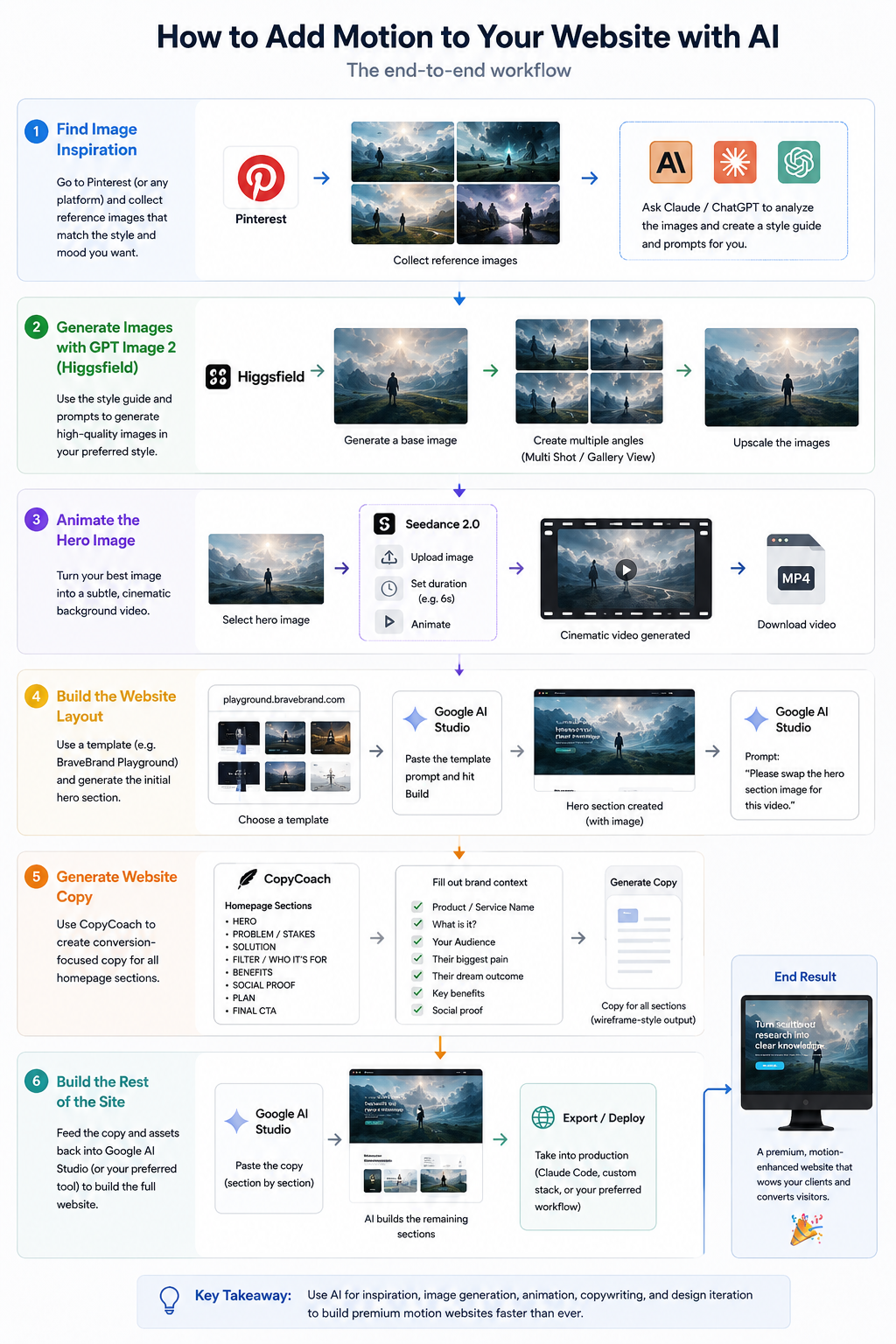
Step 1: Find Visual Inspiration
All right, so let's go out onto Pinterest and let's start looking for some different options. Okay, so once you find like a nice collection of images and you like what you're ultimately seeing, you can then take your image references and basically copy it, pop it into Claude or any other platform you want.
Prompt
Can you please take this image and analyze it so we can turn it into a style guide style reference that we can use across other image generation LLMs, please?
I'll get Claude to analyse the image, create a bunch of prompts for me, and then what I can do is move into um Higgs Field, where we will be creating our images.
Step 2: Generate Images in HiggsField
When we're inside of HiggsField, I go to GPT Image 2, and you can see here are all of the images that we've been creating. So, one thing I like about working inside of uh Higgs Field is if I find an image that I ultimately like, so for example, like this was one image that we found on Pinterest, my prompt was to change the colors and explore a different pose.
So, once I had this, I was then able to expand it into a gallery view, and then I was able to upscale those into different images itself. And that's how you create like a really awesome photo shoot for the brands that you're working with, okay? So, for example, here I had a reference image.
I got it to expand it and create multiple angles for that that I could then use across my website. So, for example, this image is a specific image that I generated using Chat GPT image tool, and you can see the original prompt that we used here.
Prompt
Create unique original web hero art: wide cinematic landscape with a lone figure overlooking glowing cloud-like data networks, soft foreground flowers, mist, pale cyan light trails, high-end Al product mood. No text, no logo, no direct copying of references. Built for landing page use with clean negative space and premium art direction.
I create a unique original web hero art, wide cinematic landscape, lone figure overlooking glowing cloud like data networks of flowers, etc. , etc. And so, all I did was I got a style that I liked. I got Chat GPT or Claude to create a distinct fingerprint, and that allowed us to, you know, not just steal and replicate other people's work. So, this image is the style reference I like for this brand. So, I'm going to go open in multi shot. Okay, and I'm just going to hit generate.
Now, this is going to create multiple shots of this actual scene, which we can then animate, we can then use in different formats across our website, and we're going to have a very uniform look and feel before we actually get into web design. Don't worry about what the website's going to look like just yet.
I'm going to give you a bunch of prompts that you can just copy and paste, drop into whatever LLM you're using, and then you can focus on generating and creating really nice visuals and images for the site so you can create something that's on brand for you or your clients. So, I'm just going to select uh the ones that I like.
I think these are all pretty cool. And I'm just going to upscale those now. All right, so these are all uh completed now. I just go over to image, hit refresh, and here are our different images from our photo shoot. All right, so now what we need is a strong uh hero image and video. So, I'm just going to go ahead and click animate this.
Step 4: Animate the Image
This is now going to open up the video panel. I'm going to go to Seedance 2.0, upload media, image generations. This is going to give me all of the stuff that um we just created. Okay. So, I'm going to select that uh hero image and I'm just going to say animate. Because there's not much movement, we'll just go for 6 seconds here.
That should be enough time. Let's hit animate. Typically, what I like to do is also give the images that I have to my AI and get my AI to write me a nice animation prompt, but for this, it's going to be quite simple. Let's see what it comes back with. All right. So, you can see our video is now done.
And that looks kind of cool. All right. So, you know, for hero background image, we don't want anything too crazy. ## Step 5: Add the Video to a Website
So, now that we've got our video, we need a website to pop it into. Okay. So, what I'm going to do now, I'm going to go to playground.bravebrand.com and you'll see here that I've got a template created for this brand already, but now we're just adding the videos.
So, you can go down and you can select whatever design style or design system you want and then drop in your own uh imagery and videos to make it your own. Okay. So, I'm just going to go ahead and select this one. I'm going to go to Google AI Studio. I'm just going to paste the prompt and you can see the entire prompt that comes from the site over there.
Prompt from `playground.bravebrand.com
# Design Spec — Polaris Ambient Explorer
## READ FIRST — Replication Contract
This file is intended to be pasted into another AI/builder as the single source needed to recreate the design. The written brief is supporting context, but the **Exact Replication Source of Truth** HTML/CSS at the bottom is canonical. Match that implementation as closely as possible, including fonts, sizing, spacing, colors, image crop, overlays, CTAs, and responsive behavior.
Do not produce a “similar vibe.” Do not redesign from scratch. Translate the embedded reference implementation faithfully into the requested stack.
## Source Direction
Primary visual: original web hero / landing page concept for **Polaris**, built from a custom generated image asset and exact implementation reference. The design should feel complete, build-ready, and visually premium.
## Core Direction
Create a polished landing page that uses the generated visual asset as the emotional center of the page. The asset should not be recreated with CSS or SVG. It should be used as a real background/media layer, with interface, typography, CTAs, and motion layered on top.
## Page Type
Premium landing page hero / website template for Playground users.
## Layout Structure
full-screen immersive hero with frosted pill navigation top-center, brand/title lower-left, glass CTA near lower center-right, supporting paragraph lower-right under a thin divider line.
## Hosted Hero Video — REQUIRED
Use this exact hero video as the primary moving background for this DesignMD. It is mandatory, not suggestive.
https://d8j0ntlcm91z4.cloudfront.net/user_30c6yRkxUog0TZ5432rCR7HN4Pe/hf_20260429_034522_e2f81b2d-d670-4124-97eb-6ab3f1b2f379.mp4
Use this exact hosted poster/fallback image if the video fails or while it loads:
https://playground.bravebrand.com/assets/backgrounds/polaris-cloud-browser-background.webp
Implementation rules:
- Use a real `<video>` element.
- Attributes: `autoplay`, `loop`, `muted`, `playsinline`, `preload="auto"`, and `disableRemotePlayback`.
- Position it as the primary hero/media layer with `object-fit: cover`.
- Keep the existing typography/UI layered above it.
- Add overlays only for readability; do not replace the video with CSS animation, stock footage, canvas particles, or a generated gradient.
- The preview/demo should show only the top hero section as a short seamless loop, not a full-page scroll.
## Image 2 Production Asset
Use this hosted production hero/background image for this template:
https://playground.bravebrand.com/assets/backgrounds/polaris-cloud-browser-background.webp

This is unique original art regenerated with OpenAI Image 2 from the saved style reference. Use the hosted URL directly so another AI or builder can replicate the design without needing a local image upload.
Local fallback if working from the full project folder: `background.png`.
## Generated Background Asset
Use this generated original asset as the primary visual/media layer:
https://playground.bravebrand.com/assets/backgrounds/polaris-cloud-browser-background.webp

The asset is unique generated art created for this template. It should be used as a real image layer with overlays, gradients, and responsive object positioning. Do not recreate this asset with CSS/SVG.
Recommended implementation:
- desktop: use as full hero background or art panel depending on layout
- mobile: crop with `object-fit: cover` and template-specific focal positioning
- add dark/colored overlays only to improve readability
## AI Builder Image Loading Note
Use the `https://playground.bravebrand.com/assets/backgrounds/...` image URL exactly as written. Do not convert it into a relative path, do not add stray quotes to the URL, and do not replace it with the Markdown alt text. If using React/Next, prefer CSS `backgroundImage: "url(IMAGE_URL)"` or a normal `<img src="IMAGE_URL" />` layer with `object-fit: cover`.
## Hosted Image Asset — REQUIRED
Use this exact hosted image URL in the implementation. Do not replace it with a placeholder, gradient-only background, stock image, or CSS recreation.
https://playground.bravebrand.com/assets/backgrounds/polaris-cloud-browser-background.webp

## Copy
Brand/logo: `Polaris`
Headline:
`Browse the web like it has a horizon.`
Supporting copy:
`A calm AI browser concept for finding signal, tracing ideas, and moving through knowledge with spatial clarity.`
Primary CTA:
`Open Polaris`
## Typography
Use a distinctive typography pairing that matches the concept. Preserve a strong hierarchy: expressive headline, restrained support copy, small polished navigation text, and clear CTA labels. If using Google Fonts, include the exact font imports in the implementation.
## Color System
Use this palette direction:
misty blue, slate, teal, lavender, pale cyan, glass white, deep foreground green.
Create CSS variables for background, surface, primary text, muted text, soft borders, primary accent, and glow accent.
## Components
- semantic header/nav
- brand mark/logo
- primary hero section
- generated visual background/media layer
- primary CTA
- secondary/ghost CTA if useful
- small microcopy/metadata/details where it supports the aesthetic
## Motion
Use polished motion, but keep it reliable and easy to replicate.
- slow camera push toward horizon
- data streams shimmer
- foreground parallax
- frosted nav sharpens on scroll
- CTA emits soft cyan glow
If using React, use Tailwind CSS and Framer Motion. If using plain HTML/CSS/JS, use CSS keyframes, transitions, and lightweight JavaScript.
## Responsive Rules
- Fully mobile responsive.
- Mobile should feel designed, not like a shrunken desktop screenshot.
- Preserve headline readability over the image.
- CTA must remain visible and tappable.
- Crop the generated background intelligently using `object-fit: cover` and responsive focal positioning.
- Avoid fixed max-width behavior that makes the design sit small on large screens.
## Accessibility
- Use semantic HTML.
- Maintain readable contrast over imagery with overlays/gradients.
- Add visible focus states.
- Respect `prefers-reduced-motion`.
- Do not rely on motion for meaning.
## Build Instruction
Build from this `design.md` only. The hosted generated background asset is already provided above and inside the reference implementation. Use it directly. Treat the reference implementation as the source of truth; do not reinterpret the design from the prose alone.
---
# Exact Replication Source of Truth
The section below is the canonical implementation reference for this design. If another AI receives only this `design.md`, it should use this code as the visual source of truth and then adapt it to the requested stack.
## Non-Negotiable Replication Rules
- Recreate the visual result from the implementation reference, not a loose reinterpretation of the written brief.
- Preserve the same typography families, weights, casing, line-height, letter-spacing, spacing scale, border radii, colors, overlays, and responsive breakpoints.
- Preserve the image placement/cropping and overlay treatment exactly unless the user explicitly asks for a different asset.
- Keep the hosted image URL exactly as provided.
- If building in React/Next/Tailwind/etc, translate the HTML/CSS faithfully rather than redesigning it.
- Do not simplify the design into a generic black/white landing page, generic SaaS page, or unrelated editorial layout.
## Visual Acceptance Checklist
Before considering the recreation complete, compare against this reference:
- Hero composition matches the reference proportions.
- Main headline scale and line breaks feel the same.
- CTA shape, size, color, and hover treatment match.
- Background image is visible and cropped like the reference.
- Overlay darkness/color preserves text readability without hiding the artwork.
- Mobile breakpoint preserves hierarchy rather than collapsing into a generic layout.
## Reference Implementation
```html
<!doctype html><html><head><meta charset='utf-8'><meta name='viewport' content='width=device-width,initial-scale=1'><link rel='preconnect' href='https://fonts.googleapis.com'><link rel='preconnect' href='https://fonts.gstatic.com' crossorigin><link href='https://fonts.googleapis.com/css2?family=Archivo:wght@400;500;600;700;800;900&family=Cormorant+Garamond:wght@500;600;700&family=IBM+Plex+Mono:wght@400;500;600&family=Instrument+Sans:wght@400;500;600;700&display=swap' rel='stylesheet'><title>Polaris</title><style>
*{box-sizing:border-box}body{margin:0;min-height:100svh;background:#071522;color:#eefaff;font-family:Instrument Sans,system-ui,sans-serif;overflow:hidden}.hero{min-height:100svh;position:relative;background:url('https://playground.bravebrand.com/assets/backgrounds/polaris-cloud-browser-background.webp') center 46%/cover no-repeat;padding:24px clamp(20px,4vw,58px);display:flex;flex-direction:column;overflow:hidden}.hero-video{position:absolute;inset:0;width:100%;height:100%;object-fit:cover;object-position:center 46%;z-index:0}.hero:before{content:'';position:absolute;inset:0;background:linear-gradient(180deg,rgba(3,12,20,.28),rgba(3,12,20,.05) 42%,rgba(3,12,20,.72)),radial-gradient(circle at 74% 72%,rgba(156,236,255,.18),transparent 28%)}nav{position:relative;z-index:2;align-self:center;display:flex;gap:12px;align-items:center;padding:10px 16px;border:1px solid rgba(238,250,255,.18);border-radius:999px;background:rgba(8,22,34,.38);backdrop-filter:blur(18px);box-shadow:0 12px 50px rgba(0,0,0,.18)}nav a{color:rgba(238,250,255,.72);font-size:12px;text-decoration:none;padding:8px 12px}.logo{width:34px;height:34px;border-radius:999px;background:radial-gradient(circle,#eefaff,#9cecff 45%,rgba(156,236,255,.08));box-shadow:0 0 30px rgba(156,236,255,.5)}.bottom{position:relative;z-index:2;margin-top:auto;display:grid;grid-template-columns:1.1fr .9fr;gap:60px;align-items:end;padding-bottom:clamp(32px,6vh,76px)}.brand{font-size:clamp(74px,12vw,176px);letter-spacing:-.08em;line-height:.78;font-weight:500}.tag{font-size:clamp(18px,2vw,32px);color:rgba(238,250,255,.72);margin-top:18px}.right{border-top:1px solid rgba(238,250,255,.28);padding-top:22px;max-width:560px;justify-self:end}p{color:rgba(238,250,255,.72);line-height:1.65}.cta{display:inline-flex;margin-top:24px;color:#071522;background:#eefaff;border-radius:999px;padding:15px 24px;text-decoration:none;box-shadow:0 0 40px rgba(156,236,255,.35);transition:.25s}.cta:hover{transform:translateY(-3px)}.foot{position:relative;z-index:2;display:flex;justify-content:space-between;font:11px IBM Plex Mono,monospace;color:rgba(238,250,255,.5);padding-bottom:10px}@media(max-width:780px){body{overflow:auto}.hero{background-position:center;min-height:100svh}nav a{display:none}.bottom{grid-template-columns:1fr;gap:26px;padding-top:30vh}.brand{font-size:clamp(64px,22vw,104px)}.right{justify-self:start}.foot{display:none}}
</style></head><body><main class='hero'><video class='hero-video' autoplay loop muted playsinline preload='auto' poster='https://playground.bravebrand.com/assets/backgrounds/polaris-cloud-browser-background.webp' disableRemotePlayback><source src='https://d8j0ntlcm91z4.cloudfront.net/user_30c6yRkxUog0TZ5432rCR7HN4Pe/hf_20260429_034522_e2f81b2d-d670-4124-97eb-6ab3f1b2f379.mp4' type='video/mp4'></video><nav><a href='#'>Search</a><a href='#'>Memory</a><div class='logo'></div><a href='#'>Spaces</a><a href='#'>Login</a></nav><section class='bottom'><div><div class='brand'>Polaris</div><div class='tag'>Browse the web like it has a horizon.</div></div><div class='right'><p>A calm AI browser concept for finding signal, tracing ideas, and moving through knowledge with spatial clarity.</p><a class='cta' href='#'>Open Polaris</a></div></section><div class='foot'><span>NEURAL CLOUD MAP</span><span>DESIGN.MD / AMBIENT EXPLORER</span></div></main></body></html>
Step 5: Build and Iterate in Google AI Studio
And I'm going to hit build. All right. Now, the reason I'm using Google AI Studio for this is this is design iteration. Okay. We want to get our designs up and running as quickly as possible and play with it in a ecosystem that is ultimately very easy to use. You could use Claude design for this.
You could use Claude code. Um whatever you want and that's why we've designed the prompts to be completely uh platform agnostic. Okay. But typically, what I like to do is when I'm in that creative phase of mood boarding, etc., etc., and I want to get these sites up and running as quickly as possible, I'll just take a prompt from this site.
I'll drop it into Google AI Studio and then I can start to iterate and design relatively fast and then once I'm ready to take that site into production, I'll move it into something like Claude code where I can start making design iterations. All right, so let's wait for this to create and then we'll start adding in our video content.
So, you can see that our hero section is now created using the same image. Now, this is baked into the prompt that we created, but I'm just going to show you now what happens when we drop our video in. Okay, so I'm going to go over here and open it. I'm going to copy video address. Google AI Studio.
Prompt
markdown
Please, can you swap the hero section image for this video, please?
All right, guys, and just like that we've got a beautiful video playing on our website.
Step 6: Build the Rest of the Page
Now, what we need to do is build the rest of this out. Okay, so I'm going to go ahead and finish off the rest of this page by adding in the various sections underneath this. Okay, because we've got the hero section locked and loaded now, AI will be able to effectively build the rest of the page pretty quickly.
Step 7: Generate Homepage Copy
And so, what I like to do for this usually is build out what my copy is going to be for the site because we need to have a site that is built for conversion and is ultimately profitable at the end of the day. We can't just have something that looks beautiful, but doesn't actually work. So, what I do typically with all of my clients and all of our website builds is we'll use the bravebrand's copycoach app.
https://copycoach.bravebrand.com/
And so, I can just choose whatever page I want to build here. So, I want homepage.
Okay, so you can either fast track this by by uploading your "brand playbook", which is a bunch of research that you get from inside of our school community. For this case, I'm just going to go for quick start and I'm going to fill out this information.
He selected HOMEPAGE
Product/Service Name:

What is it? (One Sentence):

Your Audience

Who is your ideal buyer?:

Their biggest pain (what keeps them up at 3am?):

What do they really want? (The dream outcome):

Proof and Benefits

Key benefits (What will they get?):

Social proof (testimonial, results, credentials):

<Generate Copy>
Okay, so you can see I've filled out all of the information on my brand's context. All right, so we're going to go ahead and hit generate copy. All right, so you can see your copy coach is now done and the way that it breaks out the homepage copy is in various sections like this. All right, so quick edits now and then let's rock and roll.
Homepage Wireframe Sections
Basically, copycoach generates a wireframe of HOMEPAGE in following sections
<HERO>
<PROBLEM / STAKES>
<SOLUTION>
<FILTER/WHO ITS FOR>
<BENEFITS>
<SOCIAL PROOF>
<PLAN>
<FINAL CTA>
## Example Generated Homepage Copy
### Hero

HERO:
Eyebrow: For founders, creators, and researchers
Headline: Turn scattered online research into clear, actionable knowledge.
Subheadline: Polaris is an AI-powered browser and knowledge workspace built to end tab overload. Connect your messy links, notes, and PDFs in one calm place so you can research faster and think clearer.
Primary CTA: Get Early Access
Secondary CTA: See how it works
### Problem / Stakes

PROBLEM / STAKES:
You don't lack information. You lack a way to make sense of it.

As an ambitious founder, consultant, or researcher, you spend a lot of time collecting ideas, studying markets, and writing content. But instead of turning scattered online research into clear insights and better decisions, you likely just feel buried under tabs, notes, bookmarks, screenshots, PDFs, and half-finished thoughts.

The friction isn't in the discovery. It's the chaos that happens between finding a good idea and actually understanding it. Every time you start a new project, you are forced to fight against your own fragmented digital footprint.

Left unchecked, this constant information anxiety drains your momentum. Valuable insights get lost in the noise, research gets repeated, and
the effort required to turn raw data into finished work only grows.
....
### Solution

SOLUTION:
Meet Polaris: The AI-powered browser and knowledge workspace

Polaris removes the friction of bouncing between fifty open tabs, scattered notes, and forgotten bookmarks. We combined a lightning-fast browser with an intelligent workspace to help founders, creators, consultants, and researchers turn raw information into clear insights, organized knowledge, and better decisions.

Transform messy tabs into a permanent memory
Stop losing your best ideas in an endless sea of open windows and disconnected apps. Polaris captures, organizes, and connects your links, notes, and PDFs automatically, giving you one calm place where your research is always safe and instantly searchable.

Understand complex topics in a fraction of the time
Stop hoarding articles for a "later" that never comes. Instantly summarize long web pages, dense PDFs, and video transcripts so you can
...
Step 8: Apply the Copy to the Website
All right, so I'm going to copy that. I'm going to go back to Google AI Studio. Please, go ahead and update according to the to the actual copy. All right, so you can see my copy is there. Let's go ahead and send it. All right, so you can see it's updated the copy and that's cool. So, we've got all of our copy in here, etc., etc.
Um and now what we want to do is just make it feel a little bit more cinematic and um awesome. One thing I do like about using Google AI Studio right now is that it allows us to quickly go in and make changes. And just as easy as that, we've got a motion-based site and we've actually brought it to life with real content and real context.
Step 9: Add More Videos and Finish the Page
So, you can see we've added some other videos throughout the site just to bring it to life and we can go in and tweak this as much as we want and get that live. So, now that that is ultimately complete, we've got our videos in, we've got our different sections, we've got our actual copy.
This is a production-ready landing page that is ready to go out into the world. Obviously, we need to do things like hosting, etc., etc. If you want to learn how to do that, I've got a bunch of other videos that go into this on my channel, all right? And so, this is just a small taste of what's possible when you start to bring video and immersive content into what you're doing.
Closing Notes

Tools like GPT Image 2 and Sead-dance 2.0 have already changed the game. So, if you want to start building beautiful sites like this, I highly recommend you check out our Prompt Playground. We've got a bunch of landing page hero sections here for you just to copy and paste and then you'll have like a base that you can start to iterate on.
You can go in, you can add your own videos, your own images, you can change the copy using CopyCoach and ultimately you could have as many landing pages and sites as you want. What we also have are a bunch of immersive quiz funnels that you can start doing for lead generation. So, if you want to bring leads into your business, now that design and funnel building has completely been democratized, you can go in and start creating immersive funnels for your clients.
We also have a bunch of carousel templates that you can use. These are specifically good for dropping directly into things like Claude Design or Google AI Studio and you can start creating beautiful social media content. So, go ahead, have a play, copy the prompts, drop them into your AI and start having some fun. This is ultimately one of the best times to be a creative in today's day and age.
What I honestly believe is that the creatives that do the work will outcompete everyone else. So, have a play my friend. I'll see you on the next one.